If you have been collecting your Pro Tools shared matches for AutoLineage, you know it can take a bit of time. I’ve found another shortcut to speed up this collection. First I check if the match has a tree and look at the tree. If it’s only a few people and all are private, there’s no point in making a gedcom of that. But when there is a tree I make a gedcom on One2Tree. Before I save the match’s name on the gedcom, I copy the name. Then when I go to do the shared matches I’ve already got the name and then only have to add p for page. Since I was already on the match’s page, I select shared matches and am ready to collect them, as I describe below.
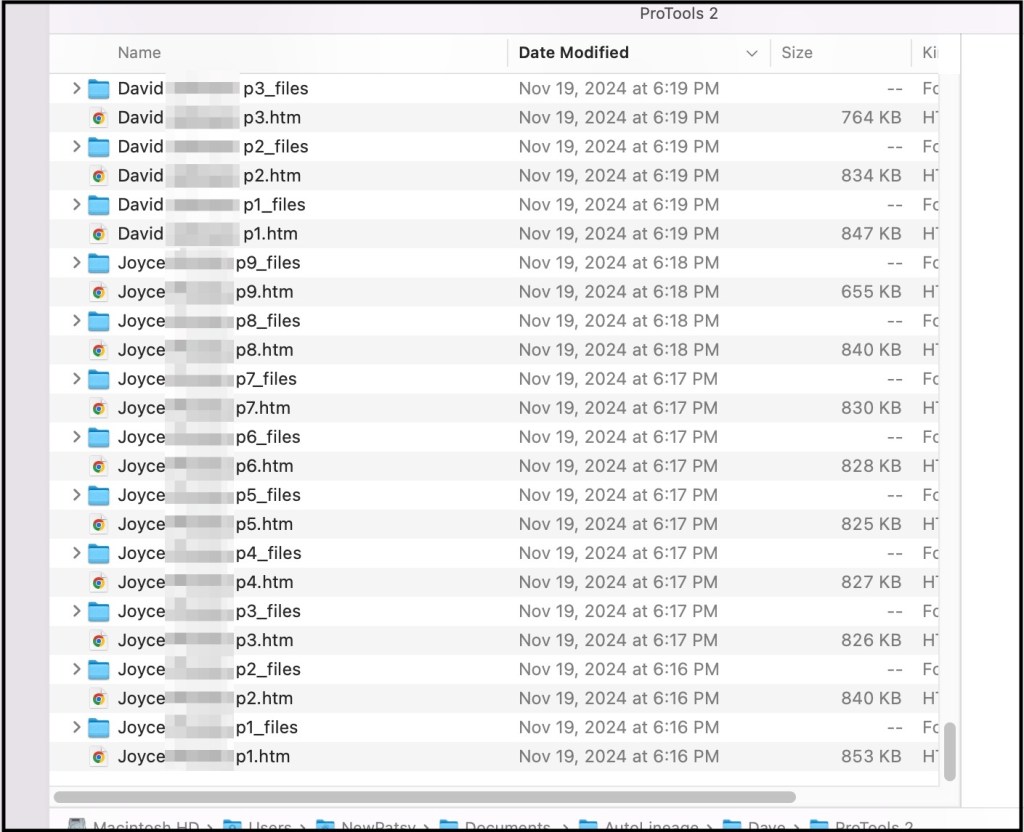
This is especially useful when the match has multiple pages of shared matches. The figure below shows match lists for Joyce, who has nine pages of shared matches and three of the pages of David’s shared matches. With these shared matches it is important to keep the folder as well as htm file that you add to AutoLineage. If you delete the folder, the htm file will also be deleted.
Directory showing some of the files of shared matches.
Tiffany is a match to Dave and she has 6 pages of matches. I start out by saving her first page.
Saving Tiffany’s first page of shared matches.
Before saving the file I copy the match name and p, which I’ll use for all of the matches other pages and just add the page number.
Copying the match’s name and p for the page number.
Then I watch as the circle, that is in the upper right bar of Chrome, fills in around the arrow to make sure that the file has been completely saved
On the left is the circle that is drawn as the file is being saved. On the right is the look after the file is saved.
Once the file is saved I position my mouse next to the arrow and change to the next page. I then leave the mouse there for the rest of the files. I also set my left hand so I can use Command S and Command V for the rest of Tiffany’s pages. I’m on a Mac and Command S saves the page in Chrome and Command V pastes the beginning of the filename that I copied earlier. On a Window computer the commands would be Control S and Control V.
Left hand positioned for Command S.
By just pivoting my fingers I can reach Command V.
Finger pivoted to reach Command V.
Once the file for the first page of Tiffany’s matches is saved, I mouse click to page 2. Then Command S brings up the ‘Save page as’ dialog. Command V copies in Tiffany p. I move my right hand and select 2, to make the file say ‘Tiffany p2’ and use the Return key to save the file. As the files are added to my directory I can see what has already been added which makes it easy to not overwrite a file.
Directory showing the files that have already been saved.
The figure below shows all six pages of Tiffany’s shared matches. The first five pages have twenty matches each and the last page has nine matches. You’ll noticed that all six pages were saved in under two minutes.
Directory showing all six pages of Tiffany’s shared matches.
Summary
I have found this to be a lot faster than having to go up to the File menu to get ‘Save page as’ and also to have to type the filename over each time. I’ve also found several matches with up to fourteen pages of shared matches. Especially when you’re trying to save a lot of shared matches to build out your clusters and subsequently the reconstructed trees, saving any time on the data collection is a bonus.
From ProTools to AutoKinship tree using matches shared by my cousin, Tish1, and me.
Genetic Affairs has unveiled a powerful new feature in AutoLineage—now you can apply AutoKinship to each individual cluster generated from Ancestry ProTools shared matches, unlocking a whole new level of insight into your family connections! It invokes the functionality of AutoKinship on the site directly at no additional cost, to provide reconstructed trees based on the shared DNA between shared matches.
In a previous blog post, I described how to get started with Ancestry and AutoLineage. In short, these are the steps involved. First, a profile is created or selected after which the same is done for a DNA test. Select a generic DNA test in order to process Ancestry matches. Next, we import DNA matches by saving each match page (make sure to set the number of matches to 50) to an HTML file. Repeat until you have enough matches. Next, we download shared matches for the matches of interest followed by a clustering analysis. Once we obtain the clusters, we can select an individual cluster for which we want to have a reconstructed AutoKinship tree.
In this blog post I will demonstrate how I cluster the shared matches of my 2nd cousin Trish. For this purpose, I will visit each DNA match page in the shared matches list with Trish and download their shared matches.
First, I imported my direct DNA matches. Next, I visited Trish her match page and downloaded the shared matches by using the Chrome “Save page as” to save the shared matches. Trish and I have three pages of shared matches, and I saved them as Trish-p1, Trish-p2 and Trish-p3. I used the “Import shared matches” to add these matches that Trish and I share. Next, I visit each DNA match in the shared matches with Trish and download the shared matches for each match.
In order to get a cluster that only showed Trish and my shared matches, I selected “DNA matches” from my DNA test linked to Ancestry page and then clicked on Trish’s name.
Partial list of my shared matches.DNA match overview for Trish.
Clicking on “perform clustering analysis” brings up the Cluster wizard. Again, this clustering approach will only take all DNA matches that are shared with Trish, basically allowing me to only cluster matches that share an ancestral connection with myself and my 2nd Trish.
Cluster Wizard.
Trish has 42 matches that she shares with me.
Clusters of Trish’s and my shared matches.
Notice the cM values listed in each of the colored cells in the cluster. These are the result of the new Ancestry ProTools data!
Trish and I share great grandparents, Thomas Byrnes and Bridget Fenton.
Trish and my family tree.
Thomas was born in County Roscommon, Ireland and Bridget in County Limerick. They met and married in Virginia. From building out family trees we know that the orange cluster has ancestors from Counties Roscommon and Mayo, and the green cluster has matches with surname Burns. Those matches would be on Thomas’ side. The brown cluster has ancestors who lived in County Limerick and would be on Bridget’s side. Very few of the matches in the large red cluster have any trees or other family information.
Clicking on “Matches” at the top of the screen brings up a table with the list of matches in each cluster.
List of matches in the clusters.
The next step is to click on cluster 3, which brings up just the red cluster. Again clicking on “Matches” at the top of the screen brings up the list of matches for cluster 3 only.. In the upper left of the screen is the “Run AutoKinship” button.
Cluster 3 matches and AuroKinship button.
Once AutoKinship analysis starts a message appears at the bottom of the screen telling you that the results will be sent to your email. The zip file should be saved to the computer and then unzipped. There are ten probability trees in the AutoKinship.
AutoKinship for the red cluster.
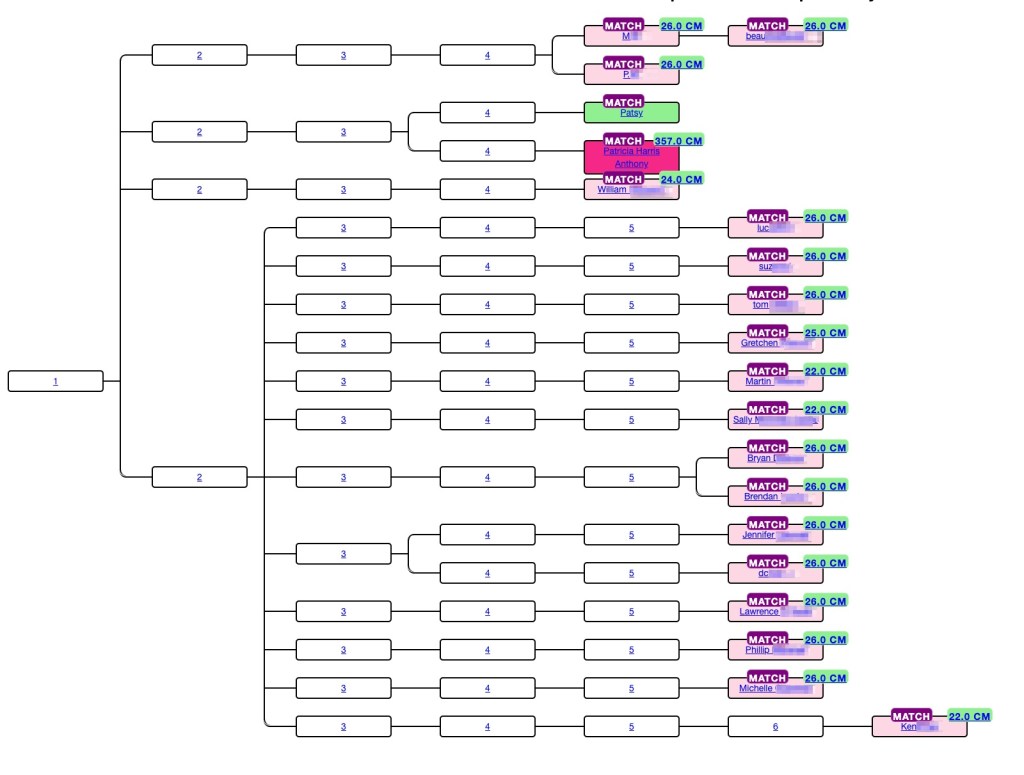
AutoKinship tree gives hints as to how matches can be related based on the amounts of shared DNA. At the top of the tree beau is listed as child of M, and M and P are listed as siblings. This is identical to what Ancestry said about these matches. But not every relationship is correct. Trish and I are second cousins, but we share a larger amount of DNA than would be expected compared to the average for second cousins, and we’re often miss assigned as first cousins or first cousins once removed. However, the AutoKinship tree can be used to get valuable hints for connections for the matches.
At the bottom of the page with the first AutoKinship tree is a matrix of the DNA matches used for the tree. This matrix can be downloading into Excel and saved.
Part of the DNA matrix for the red cluster.
In conclusion being able to organize you Ancestry ProTool matches into a probability tree and generate a matrix provides addition methods for viewing your shared matches.
Note that the current AutoKinship approach will be replaced with a more versatile version that will run directly in AutoLineage. This version will allow for using pre-determined relationships or integration of known trees into the reconstructed trees.
Patricia Harris Anthony, Trish, has given me permission to use her real name and her data.
When I saw that ancestry was showing how many centimorgans, cM, your matches share with other shared matches like 23andMe and MyHeritage have been doing all along, I decided I needed to purchase the Pro Tools. One of the things I’ve been doing is to look at close shared matches and see how much they share with other shared matches. Then I built a matrix of these of these data. This allowed me to determine where additional cousins fit into my family tree. In one example, there was a cousin that I knew was one my mother’s paternal side, but he had a fake name and no tree, so I couldn’t tell exactly where he fit. Seeing how much he shared with other known cousins provided the answer.
Jim Antley has a program that copies the shared matches from the Pro Tools. After viewing the page of shared matches select “Save Page As” from the ‘file’ menu on Chrome. Do not change the filename and save the file. Make sure that the little circle at the top right of Chrome has completed before leaving the tab, as shown in figure 1.
Figure 1. The little circle filling on the left, and after it has completed and the file is saved, on the right.
Next open “The Antley Method DNA Connections Display Tool” and choose the file that you just saved. Next ‘upload’ the file. When the page changed you can select various parameters if you want to limit the data. I have left all the defaults at this page. The resulting screen is displayed. There are two tables displayed. Figure 2 shows the beginning of the first chart that is at the top of the window. This is the list of shared matches for my cousin len and me. Len does not have a tree and I don’t know where he fits in my tree. Both cvr and Joseph are known cousins and in my tree. Being able to see how many centimorgans Len shares with them and the others in the table will allow me to place him in my tree.
The second table that is displayed in figure 3. This is the table that I use as I want to make a matrix with the matches relationship to each other as well as to me.
Figure 3. This table is shown below the one in figure 1. Scroll down the page to find it.
I ‘select all’ on the page, and then ‘copy’ it. Going to a new Excel file I ‘copy’ it. To avoid clicking on a link in error, while the data is all highlighted, I right click and select ‘Remove Hyperlinks’. Since I want the second table I scroll down the Excel file and either delete the top table or just work with the second table. The beginning of that Excel table is shown in figure 4.
Figure 4. The Excel file that I use.
I am interested in knowing about the trees and will add that data as a separate column, but I mainly want the cM values. To make it easy to get that information, I first turn off merge cells for columns B and C and then select columns A through C for the match name the shared cM for both myself and the other match, here that match would be Len. To turn off the merged cells I select columns B and C, then select ‘Format’ and ‘Cells’ and unclick ‘Merge’. Figure 5 shows the resulting file.
Figure 5. After turning off merged cells in columns B and C.
Now the match name and the cM that they share are on the same row. I select columns A through C for each match and then ‘copy’ and ‘paste’ to a new Excel file. Since I no longer need this Excel file I delete it. In the new Excel file I add a new row 1 and then copy the list of names in column A and paste them transposed in row 1 starting in column B. This gives me the beginning of the matrix. I add yellow color to the cells where each match would match themselves. Figure 6 shows the beginning to my matrix.
Figure 6. The beginning of the matrix.
I know that cvn and Joseph are my second cousins, 2C, and that Jeffrey is cvn’s son. Andrew is second cousins twice removed, 2C2R, and G.P. is second cousin once removed, 2C1R to me. An important clue here already is that the amount of DNA G.P. shares with len would be that of a nephew. After adding all of the matches I look specifically at the amount of DNA I share with each match. For amounts less than 90 cM, I use the unweighted amounts of DNA and I add the number of segments. The unweighted DNA amounts agree with the amounts of shared DNA on other sites. The matrix now is shown in figure 7.
Figure 7. The completed matrix to determine how len fits in my family tree.
Adding all this information I can see that len fits in my tree, as shown in figure 8. This tree was generated using AutoLineage and included DNA matches from several different testing sites. The 65 cM is on the low side for a second cousin, but not impossible. Len is first cousin to Joseph and to cvr and uncle to G.P. He is second cousin to me. Even though we only share 65 cM with 4 segments. Both the Shared cM project and SegcM list it as possible.
Figure 8. My maternal paternal family tree.
Third or Fourth Great Grandmother?
I decided to try another problem that I’d not been able to solve for years. My second great grandmother was Mary Aide, born in County Kilkenny, Ireland. I have DNA matches to Dawn and several others on the Aide line whose third great grandmother was Mary Kilfoil. Is Mary Kilfoil my Mary’ Aide’s mother or perhaps grandmother? Using the Pro Tools I was able to see how several other matches were related to Dawn and her sister, Sheri. Perhaps knowing how more DNA matches were related to me and to them would help this problem. I used the same process as I described above. I started building out my matrix with known matches who descended from Mary Kilfoil and adding the amounts I shared with them and the amounts they shared with each other to try to build out a more complete tree for her family. There are several parent – child matches. My daughter Jenn, Dawn’s son Ryan, and Kath’s daughter Abby show up as matches to several of the others.
Figure 9. Aide Matrix.
A couple days ago I saw a YouTube that Dana Leeds did on how she uses these Pro Tools. She has four steps when she reviews the shared matches; looking at trees, common ancestor hints, her notes and then looking at the highest match in the shared matches list. Dawn shared her tree with me years ago, and we’ve been trying to figure out the connection. Looking at common ancestors Dawn, Sheri, Kath, Ron, Dan, Matt, and Ryan all show Mary Kilfoil as common ancestor to me, and Through Lines show Mary Kilfoil as my third great grandmother. My notes all indicate that Mary Kilfoil is the common ancestor, and the highest match to Dawn is her sister Sheri.
If Mary Kilfoil is my third great grandmother Dawn, Sheri, Kath, Dan and Matt would be my fourth cousins (4C) and Abby and Ryan would be fourth cousins once removed (4C1R). Conversely is Mary Kilfoil is my fourth great grandmother they would be 5C and 5C1R. From either the Shared cM Project or SegcM it’s not obvious which is the case. Next I put the data into BanyanDNA, see figure 10, setting it up so that I was the hypotheses. Two my of second cousins who also descend from Mary Aide have done DNA tests but not at Ancestry. Jennie tested at FamilyTreeDNA and Fred at 23andMe.
Figure 10. BanyanDNA tree.
Hypothesis 1 would have Mary Kilfoil as my third great grandmother and hypothesis 2 would say that she is my fourth great grandmother. The results are shown in figure 11.
Figure 11. Hypotheses results.
Now that I know where Mary Kilfoil is in my family tree I added her to my tree on Genetic Affairs AutoLineage as well. Then I ran ‘Find Common Ancestors.’ Figure 12 shows my new reconstructed family tree which includes additional DNA matches of mine from other sites. Details of using AutoLineage can be found at my earlier blog post.
Figure 12. AutoLineage Reconstructed family tree for my Barry and Aide side.
Conclusion
I have a number of other matches where I’m not quite sure where the match fits in my family tree. From these two examples it appears that using the new Pro Tools to see shared DNA matches will be very helpful. Now on to more complicated matches and finding new cousins!
If you have questions about how to get the most from Ancestry Pro Tools or any of your DNA results contact me at: info@patriciacolemangenealogy.com